




😀
这里写文章的前言:
一个简单的开头,简述这篇文章讨论的问题、目标、人物、背景是什么?并简述你给出的答案。
一个简单的开头,简述这篇文章讨论的问题、目标、人物、背景是什么?并简述你给出的答案。
可以说说你的故事:阻碍、努力、结果成果,意外与转折。
来源:https://linux.do/t/topic/136358
如何分享
登录后访问:https://claude.7998888.xyz/api/auth/session
感谢分享。还可以 /login_token?session_key=sk-xxx 直接跳转哦
,然后F12 打开控制台,输入以下命令回车
var t=document.body.innerText.match(/({.*})/s)[0],u="https://demo.fuclaude.com/login_token?session_key="+JSON.parse(t).sessionKey,i=document.createElement('input');document.body.appendChild(i);i.value=u;i.select();document.execCommand('copy');document.body.removeChild(i);alert('URL已复制到剪贴板');
JavaScript
分享链接就复制好了,直接分享给朋友,点击即可食用
<ins/>
如何分站
注意:分站必须建立在受支持的地区
- 下载解压默认的 amd64 ,如有必要请自行修改,注意中途需要输入解压密码
linux.do后回车
wget $(curl -s https://api.github.com/repos/wozulong/fuclaude/releases/latest | jq -r '.assets[] | select(.name | contains("linux-amd64")) | .browser_download_url') -O fuclaude.zip && unzip -j fuclaude.zip 'fuclaude*/*' -d fuclaude && cd fuclaude
Shell
- 配置文件注意替换
你的密码
sed -i 's/"site_password": ""/"site_password": "你的密码"/; s/127.0.0.1:8181/0.0.0.0:8100/g; s/"signup_enabled": false/"signup_enabled": true/; s/"show_session_key": false/"show_session_key": true/' config.json
Rust
- 运行程式
nohup ./fuclaude > output.log 2>&1 &


停止:pkill -9 -f "./fuclaude"
Shell
参考链接
高级-配置warp代理
1. 安装 WARP 官方客户端或 WireGuard 模式
项目支持两种代理方式:
- WARP 官方客户端(提供 SOCKS5 代理)
- WireGuard 模式(全局或分流量代理)
推荐使用 WireGuard 模式,因其更灵活且支持分应用代理。运行以下命令安装:
wget -N https://gitlab.com/fscarmen/warp/-/raw/main/menu.sh && bash menu.sh
Plain text
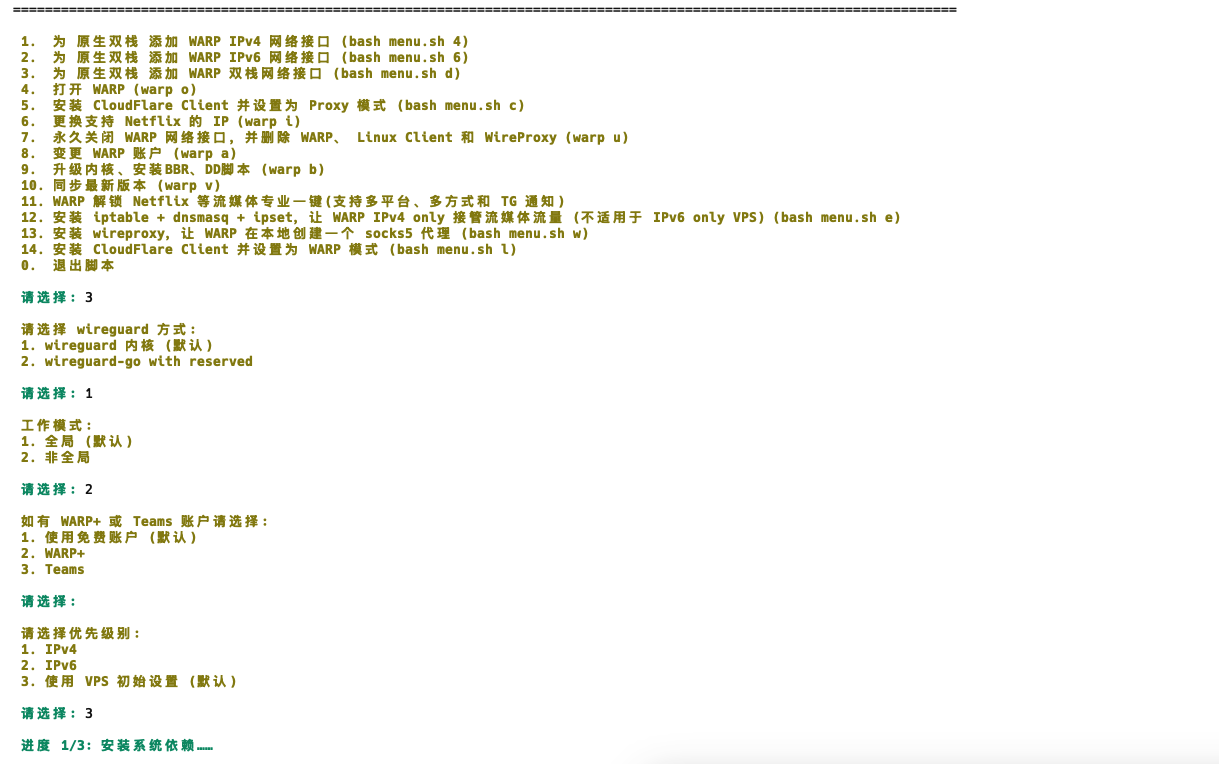
完成的配置命令行输出:
======================================================================================================================

 脚本版本:3.1.5
 功能新增:1. Client 的 Warp 模式(网络接口)处理了重启后不工作的问题; 2. 修正 Team IPv6 判断的正则
 系统信息:
	 当前操作系统:Ubuntu 24.04.2 LTS
	 内核:6.8.0-56-generic
	 处理器架构:amd64
	 虚拟化:kvm
	 IPv4: 47.79.90.70 日本  Alibaba (US) Technology Co., Ltd.
	 IPv6: 240b:4009:25a:1802:0:c45f:443a:369a 日本  Alibaba (US) Technology Co., Ltd.
	 WARP 网络接口未开启
	 Client 未安装
	 WireProxy 未安装

======================================================================================================================

 1.  为 原生双栈 添加 WARP IPv4 网络接口 (bash menu.sh 4)
 2.  为 原生双栈 添加 WARP IPv6 网络接口 (bash menu.sh 6)
 3.  为 原生双栈 添加 WARP 双栈网络接口 (bash menu.sh d)
 4.  打开 WARP (warp o)
 5.  安装 CloudFlare Client 并设置为 Proxy 模式 (bash menu.sh c)
 6.  更换支持 Netflix 的 IP (warp i)
 7.  永久关闭 WARP 网络接口,并删除 WARP、 Linux Client 和 WireProxy (warp u)
 8.  变更 WARP 账户 (warp a)
 9.  升级内核、安装BBR、DD脚本 (warp b)
 10. 同步最新版本 (warp v)
 11. WARP 解锁 Netflix 等流媒体专业一键(支持多平台、多方式和 TG 通知)
 12. 安装 iptable + dnsmasq + ipset,让 WARP IPv4 only 接管流媒体流量 (不适用于 IPv6 only VPS) (bash menu.sh e)
 13. 安装 wireproxy,让 WARP 在本地创建一个 socks5 代理 (bash menu.sh w)
 14. 安装 CloudFlare Client 并设置为 WARP 模式 (bash menu.sh l)
 0.  退出脚本

 请选择: 3

 请选择 wireguard 方式:
 1. wireguard 内核 (默认)
 2. wireguard-go with reserved

 请选择: 1

 工作模式:
 1. 全局 (默认)
 2. 非全局

 请选择: 2

 如有 WARP+ 或 Teams 账户请选择:
 1. 使用免费账户 (默认)
 2. WARP+
 3. Teams

 请选择:

 请选择优先级别:
 1. IPv4
 2. IPv6
 3. 使用 VPS 初始设置 (默认)

 请选择: 3

 进度 1/3: 安装系统依赖……

Hit:1 https://download.docker.com/linux/ubuntu noble InRelease
Hit:2 https://apt.v2raya.org v2raya InRelease
Hit:3 http://security.ubuntu.com/ubuntu noble-security InRelease
Hit:4 http://archive.ubuntu.com/ubuntu noble InRelease
Get:5 http://archive.ubuntu.com/ubuntu noble-updates InRelease [126 kB]
Err:2 https://apt.v2raya.org v2raya InRelease
  GPG: add_keyblock_resource 33587281  GPG: keydb_search 33554445  GPG: keydb_search 33554445
Hit:6 http://archive.ubuntu.com/ubuntu noble-backports InRelease
0% [Working]
 进度 2/3: 已安装 WARP

Fetched 126 kB in 2s (72.6 kB/s)
Reading package lists... Done
Building dependency tree... Done
Reading state information... Done
3 packages can be upgraded. Run 'apt list --upgradable' to see them.
W: An error occurred during the signature verification. The repository is not updated and the previous index files will be used. GPG error: https://apt.v2raya.org v2raya InRelease: GPG: add_keyblock_resource 33587281  GPG: keydb_search 33554445  GPG: keydb_search 33554445
W: Failed to fetch https://apt.v2raya.org/dists/v2raya/InRelease  GPG: add_keyblock_resource 33587281  GPG: keydb_search 33554445  GPG: keydb_search 33554445
W: Some index files failed to download. They have been ignored, or old ones used instead.
Reading package lists... Done
Building dependency tree... Done
Reading state information... Done
Package openresolv is not available, but is referred to by another package.
This may mean that the package is missing, has been obsoleted, or
is only available from another source

E: Package 'openresolv' has no installation candidate
Reading package lists... Done
Building dependency tree... Done
Reading state information... Done
The following NEW packages will be installed:
  wireguard-tools
0 upgraded, 1 newly installed, 0 to remove and 3 not upgraded.
Need to get 89.1 kB of archives.
After this operation, 330 kB of additional disk space will be used.
Get:1 http://archive.ubuntu.com/ubuntu noble/main amd64 wireguard-tools amd64 1.0.20210914-1ubuntu4 [89.1 kB]
Fetched 89.1 kB in 1s (81.1 kB/s)
Selecting previously unselected package wireguard-tools.
(Reading database ... 125001 files and directories currently installed.)
Preparing to unpack .../wireguard-tools_1.0.20210914-1ubuntu4_amd64.deb ...
Unpacking wireguard-tools (1.0.20210914-1ubuntu4) ...
Setting up wireguard-tools (1.0.20210914-1ubuntu4) ...
wg-quick.target is a disabled or a static unit, not starting it.
Processing triggers for man-db (2.12.0-4build2) ...
Scanning processes...
Scanning linux images...

Running kernel seems to be up-to-date.

No services need to be restarted.

No containers need to be restarted.

No user sessions are running outdated binaries.

No VM guests are running outdated hypervisor (qemu) binaries on this host.

 进度 3/3: 寻找 MTU 最优值和优选 endpoint 地址已完成

 创建快捷 warp 指令成功
 运行 WARP
 后台获取 WARP IP 中,最大尝试5次……
 第1次尝试
 已成功获取 WARP Free 网络, 工作模式: 非全局

==============================================================

 IPv4: 104.28.211.105 日本  Cloudflare, Inc.
 IPv6: 2a09:bac5:4434:dc::16:1ef 日本  Cloudflare, Inc.
 恭喜!WARP Free 已开启,总耗时:22秒, 脚本当天运行次数:,累计运行次数:
 IPv6 优先 , 工作模式: 非全局

==============================================================

 再次运行用 warp [option] [lisence],如

 warp h (帮助菜单)
 warp n (获取 WARP IP)
 warp o (临时warp开关)
 warp u (卸载 WARP 网络接口和 Socks5 Client)
 warp b (升级内核、开启BBR及DD)
 warp a (更换账户为 Free,WARP+ 或 Teams)
 warp v (同步脚本至最新版本)
 warp r (WARP Linux Client 开关)
 warp 4/6 (WARP IPv4/IPv6 单栈)
 warp d (WARP 双栈)
 warp c (安装 WARP Linux Client,开启 Socks5 代理模式)
 warp l (安装 WARP Linux Client,开启 WARP 模式)
 warp i (更换支持 Netflix 的IP)
 warp e (安装 Iptables + dnsmasq + ipset 解决方案)
 warp w (安装 WireProxy 解决方案)
 warp y (WireProxy socks5 开关)
 warp k (切换 wireguard 内核 / wireguard-go-reserved)
 warp g (切换 warp 全局 / 非全局)
 warp s 4/6/d (优先级: IPv4 / IPv6 / VPS default)

root@s31934:~# ip a show wgcf
Device "wgcf" does not exist.
root@s31934:~# warp c

 所有依赖已存在,不需要额外安装

 检查环境中……

 官方 Client bug,在隧道协议为 WireGuard 时,如使用 WARP+ license,不能使用 IPv6,详见社区:https://community.cloudflare.com/t/losing-ipv6-connectivity-with-warp/568971

 请选择 WARP 隧道协议:
 1. MASQUE (默认)
 2. WireGuard

 请选择: 2

 账户请选择:
 1. 使用免费账户 (默认)
 2. WARP+

 请选择:
 请自定义 Client 端口号 (1000-65535,如果不输入,会默认40000):
 进度 1/3: 安装 Client……
deb [signed-by=/usr/share/keyrings/cloudflare-warp-archive-keyring.gpg] https://pkg.cloudflareclient.com/ noble main
Hit:1 https://apt.v2raya.org v2raya InRelease
Hit:2 https://download.docker.com/linux/ubuntu noble InRelease
Get:3 https://pkg.cloudflareclient.com noble InRelease [2567 B]
Err:1 https://apt.v2raya.org v2raya InRelease
  GPG: add_keyblock_resource 33587281  GPG: keydb_search 33554445  GPG: keydb_search 33554445
Hit:4 http://archive.ubuntu.com/ubuntu noble InRelease
Hit:5 http://security.ubuntu.com/ubuntu noble-security InRelease
Hit:6 http://archive.ubuntu.com/ubuntu noble-updates InRelease
Hit:7 http://archive.ubuntu.com/ubuntu noble-backports InRelease
Get:8 https://pkg.cloudflareclient.com noble/main amd64 Packages [458 B]
Fetched 3025 B in 2s (1817 B/s)
Reading package lists... Done
Building dependency tree... Done
Reading state information... Done
3 packages can be upgraded. Run 'apt list --upgradable' to see them.
W: An error occurred during the signature verification. The repository is not updated and the previous index files will be used. GPG error: https://apt.v2raya.org v2raya InRelease: GPG: add_keyblock_resource 33587281  GPG: keydb_search 33554445  GPG: keydb_search 33554445
W: Failed to fetch https://apt.v2raya.org/dists/v2raya/InRelease  GPG: add_keyblock_resource 33587281  GPG: keydb_search 33554445  GPG: keydb_search 33554445
W: Some index files failed to download. They have been ignored, or old ones used instead.
Reading package lists... Done
Building dependency tree... Done
Reading state information... Done
The following additional packages will be installed:
  desktop-file-utils gnupg2 libnss3-tools
Suggested packages:
  traceroute
The following NEW packages will be installed:
  cloudflare-warp desktop-file-utils gnupg2 libnss3-tools
0 upgraded, 4 newly installed, 0 to remove and 3 not upgraded.
Need to get 45.6 MB of archives.
After this operation, 127 MB of additional disk space will be used.
Get:1 https://pkg.cloudflareclient.com noble/main amd64 cloudflare-warp amd64 2025.1.861.0 [44.9 MB]
Get:2 http://archive.ubuntu.com/ubuntu noble/universe amd64 gnupg2 all 2.4.4-2ubuntu17 [4748 B]
Get:3 http://archive.ubuntu.com/ubuntu noble/main amd64 desktop-file-utils amd64 0.27-2build1 [53.8 kB]
Get:4 http://archive.ubuntu.com/ubuntu noble/main amd64 libnss3-tools amd64 2:3.98-1build1 [615 kB]
Fetched 45.6 MB in 2s (24.5 MB/s)
Selecting previously unselected package gnupg2.
(Reading database ... 125076 files and directories currently installed.)
Preparing to unpack .../gnupg2_2.4.4-2ubuntu17_all.deb ...
Unpacking gnupg2 (2.4.4-2ubuntu17) ...
Selecting previously unselected package desktop-file-utils.
Preparing to unpack .../desktop-file-utils_0.27-2build1_amd64.deb ...
Unpacking desktop-file-utils (0.27-2build1) ...
Selecting previously unselected package libnss3-tools.
Preparing to unpack .../libnss3-tools_2%3a3.98-1build1_amd64.deb ...
Unpacking libnss3-tools (2:3.98-1build1) ...
Selecting previously unselected package cloudflare-warp.
Preparing to unpack .../cloudflare-warp_2025.1.861.0_amd64.deb ...
Unpacking cloudflare-warp (2025.1.861.0) ...
Setting up gnupg2 (2.4.4-2ubuntu17) ...
Setting up desktop-file-utils (0.27-2build1) ...
Setting up libnss3-tools (2:3.98-1build1) ...
Setting up cloudflare-warp (2025.1.861.0) ...
Created symlink /etc/systemd/system/multi-user.target.wants/warp-svc.service → /usr/lib/systemd/system/warp-svc.service.
Processing triggers for man-db (2.12.0-4build2) ...
Scanning processes...
Scanning linux images...

Running kernel seems to be up-to-date.

No services need to be restarted.

No containers need to be restarted.

No user sessions are running outdated binaries.

No VM guests are running outdated hypervisor (qemu) binaries on this host.
 进度 2/3: 设置 Client 模式
 Linux Client 正常运行中。 Socks5 代理监听:127.0.0.1:40000
 创建快捷 warp 指令成功

==============================================================

 恭喜!WARP Free Linux Client 工作中, 总耗时:25秒, 脚本当天运行次数:,累计运行次数:
 本地 Socks5: 127.0.0.1:40000
 WARP Free IPv4: 104.28.211.105 日本 Cloudflare, Inc.
 WARP Free IPv6: 2a09:bac5:4301:dc::16:1bb 日本 Cloudflare, Inc.

==============================================================

 再次运行用 warp [option] [lisence],如

 warp h (帮助菜单)
 warp n (获取 WARP IP)
 warp o (临时warp开关)
 warp u (卸载 WARP 网络接口和 Socks5 Client)
 warp b (升级内核、开启BBR及DD)
 warp a (更换账户为 Free,WARP+ 或 Teams)
 warp v (同步脚本至最新版本)
 warp r (WARP Linux Client 开关)
 warp 4/6 (WARP IPv4/IPv6 单栈)
 warp d (WARP 双栈)
 warp c (安装 WARP Linux Client,开启 Socks5 代理模式)
 warp l (安装 WARP Linux Client,开启 WARP 模式)
 warp i (更换支持 Netflix 的IP)
 warp e (安装 Iptables + dnsmasq + ipset 解决方案)
 warp w (安装 WireProxy 解决方案)
 warp y (WireProxy socks5 开关)
 warp k (切换 wireguard 内核 / wireguard-go-reserved)
 warp g (切换 warp 全局 / 非全局)
 warp s 4/6/d (优先级: IPv4 / IPv6 / VPS default)

root@s31934:~# curl --socks5 127.0.0.1:40000 ifconfig.me
2a09:bac5:4301:dc::16:1bbroot@s31934:~# warp 4

 所有依赖已存在,不需要额外安装

 检查环境中……
 Socks5 代理正在运行中,不能转为 WARP IPv4 或者双栈网络接口,脚本中止,问题反馈:[https://github.com/fscarmen/warp-sh/issues]
root@s31934:~#
Shell
在config.json配置代理
{
  "bind": "0.0.0.0:8100",
  "timeout": 600,
  "proxy_url": "socks5://127.0.0.1:40000",
  "real_logout": false,
  "site_password": "",
  "cookie_secret": "b2v7Rvj1J2BtaZYYzbLuLnSzRIxAuYtz",
  "openai_base_url": "https://api.openai.com/v1",
  "openai_api_key": "sk-xxx",
  "moderation_model": "text-moderation-latest",
  "moderation_enabled": false,
  "signup_enabled": true,
  "show_session_key": true
}
JSON
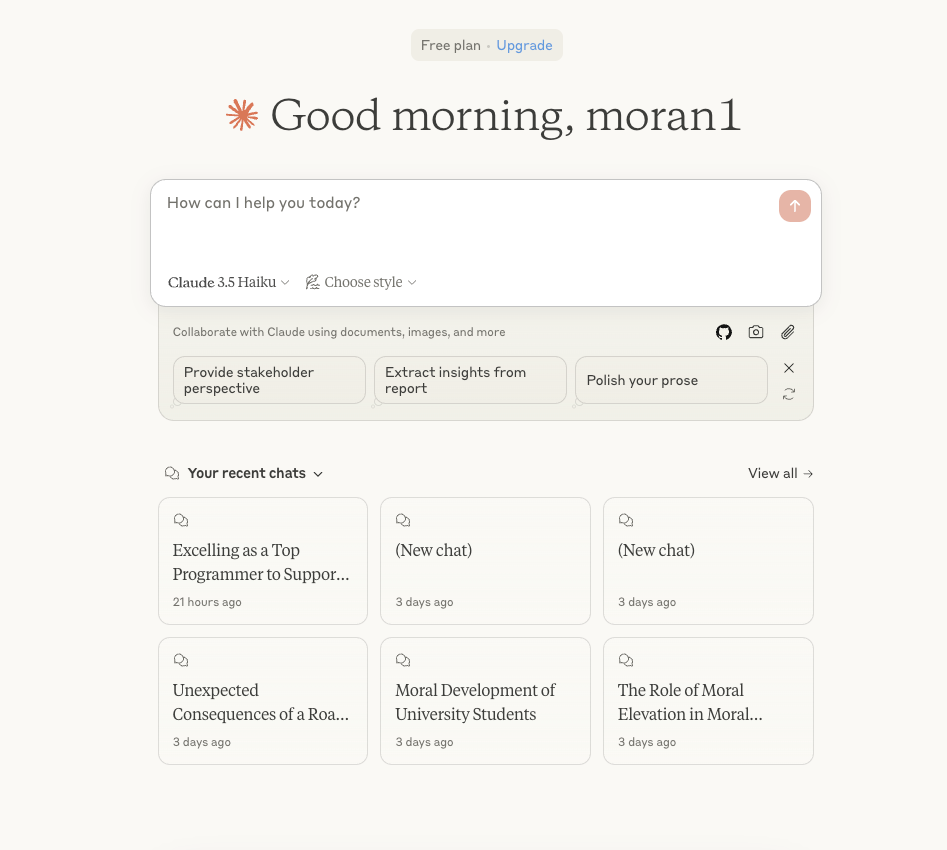
效果
从有验证
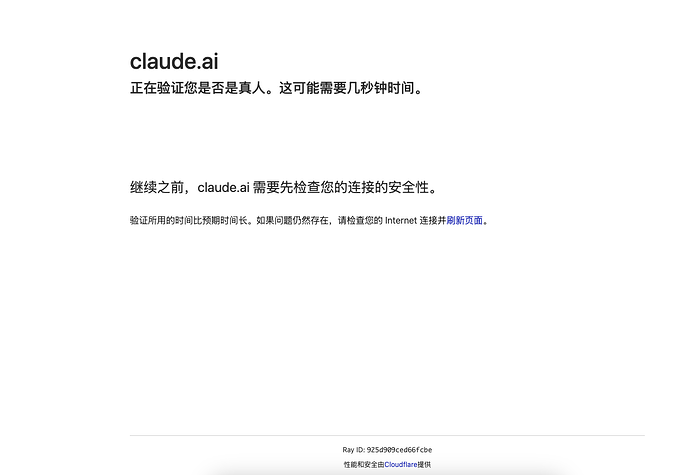
到无需验证
💡
有关Notion安装或者使用上的问题,欢迎您在底部评论区留言,一起交流~
原文归档:https://blog.7998888.xyz/technology/1baa8b91-8e49-809a-ac0b-d032d6a55802
© 版权声明
文章版权归作者所有,未经允许请勿转载。
THE END






暂无评论内容